Lab: Cloudflare CDN, R2 and the Worker sample. PLO: PLO2 / PLO1. Points: 7.
Overview
The campus media unit serves about 300 video views and 5,000 thumbnails a day to viewers in Thailand and ASEAN. The one big idea for this session: the edge is a cache, and a cache hit is a design decision. A CDN does not make the origin faster. It removes trips to the origin. The bill follows the same logic: originegress is the cost a CDN is meant to reduce, and a low hit rate gives you both the latency and the bill.
The targets from the scenario spine: thumbnail p95 under 200 ms; video start under 2 s; Bangkok p95 under 50 ms, Chiang Mai under 30 ms and Singapore under 80 ms.
This session moves that idea onto Cloudflare: a public R2 bucket for thumbnails, a private R2 bucket for the catalogue, a Worker that serves the API, and a Cache Rule that decides what the edge may keep. The lab is the same lesson as any CDN lab, but the pieces are concrete enough to inspect: every response prints its cache status, and every rule is a setting you can read back.
Lesson
The path to the first byte
A request first resolves a name through DNS, opens a TCP connection, performs a TLS handshake and only then sends HTTP. Each step costs at least one round trip, and the round trip is bounded by distance: light in fibre takes roughly 5 microseconds per kilometre, and every router and congestion point adds queueing on top.
A CDN shortens the path by answering at an edge close to the viewer. It does not remove DNS, TCP or TLS, and it cannot shorten the viewer's own access network — the last mile. That is why a CDN improves time-to-first-byte dramatically and total download time only partly: the first byte stops travelling to another continent, but the bytes still cross the viewer's mobile or campus link.
Cloudflare's edge is anycast: the same IP address is announced from many points of presence (PoPs), and the routing system delivers each viewer to a nearby one. In Thailand a request commonly lands in Bangkok (BKK) or Singapore (SIN); /cdn-cgi/trace prints the colo that answered, which is how the lab proves where the edge was.
What "the edge is a cache" actually means
An edge cache is a store of copies keyed by a request. The key is normally the host, the path and the query string — not the viewer. When a request matches a stored copy that is still fresh, the edge answers from its own disk or memory: a cache hit. When it does not, the edge forwards the request to the origin, receives the response and may store a copy: a cache miss.
Two consequences follow, and both are examinable:
A hit is cheaper and faster than a miss, but only for the second viewer. The first viewer always pays the origin trip.
The cache is only as correct as its freshness rule. A copy that is too old is a bug; a copy that is thrown away too early is a cost. The whole tuning problem is choosing how long a copy may be trusted.
A TTL is that freshness lifetime. A short TTL keeps content current and lowers the hit rate. A long TTL raises the hit rate and raises the risk that a viewer sees yesterday's file. There is no setting that is both maximally fresh and maximally cheap; the choice is a design decision, and the session's research question is how to make it deliberately.
Cache eligibility: not every response may be stored
Before any TTL applies, the edge must be allowed to store the response. HTTP decides this with headers:
cache-control: public, max-age=3600 says the response may be stored by shared caches for an hour.
cache-control: no-store says it must not be stored at all.
private says a browser may store it but a shared edge may not.
Cloudflare adds a second layer. On a proxied zone — a domain whose DNS records point through Cloudflare — the zone's Cache Rules decide eligibility and TTL for matching requests. A rule can say "for this host and this path prefix, cache everything, override the origin's TTL with two hours at the edge and sixty seconds in the browser". That is the rule the lab builds.
Two facts make the lab's sequence make sense:
R2 custom domains cache some content types by default and not others. Images such as JPEG are cacheable; application/json and text/plain are not. So the thumbnail shows MISS → HIT before any rule, while the manifest shows DYNAMIC (not cached) until the rule is applied. The two objects are the control and the treatment in one experiment.
Zone Cache Rules never apply to a Worker's own responses. A Worker runs at the edge and returns a response the zone did not fetch; the zone cache settings do not intercept it. The fallback for a Worker without a zone is Cloudflare's Workers Cache, which is a different mechanism with a different limitation: it can only be purged from inside the Worker.
Reading cf-cache-status
Every response from a proxied hostname carries cf-cache-status. The values the lab relies on:
Value
Meaning
MISS
The edge did not have a fresh copy; it fetched the origin and stored the response.
HIT
The edge answered from its copy; the origin saw nothing.
DYNAMIC
The response is not eligible for caching; the edge passed it through.
EXPIRED
A copy existed but its TTL had passed; the edge revalidated or refetched.
BYPASS
A rule or request header explicitly bypassed the cache.
REVALIDATED
The edge asked the origin whether its copy was still valid and kept it.
The measurement habit is simple: request the same URL twice and read the status. MISS then HIT is the proof that the edge is doing its job. DYNAMIC twice is the proof that it is not, and that a rule is missing or mis-scoped.
There is a second habit hidden in the table: the cache has no idea what your content means. It stores bytes under a key. If you overwrite the bytes at the same key, the edge keeps serving its copy until the TTL expires. That is not a bug; it is what a long TTL buys. The next section is the two ways out.
Invalidation, purge and versioned names
An invalidation — Cloudflare calls it a purge — removes a cached copy before its TTL expires. The next request is a miss and refetches. It is a correction for a mistake or an emergency, not a caching strategy: it does not scale to "every time we publish", and on the Free plan it is rate-limited to 5 purges per minute.
The alternative is to make the key change. Upload the new file under a versioned name — thumb-0001.v2.jpg instead of thumb-0001.jpg — and the new bytes are a new key with no old copy to fight. Nothing is purged; the old key keeps serving whoever still asks for it; the long TTL stays safe because the name is immutable.
The rule of thumb:
Immutable assets (thumbnails, video renditions, fonts): version the name, cache for a long TTL, never purge.
Mutable names (an HTML page at a fixed URL, a manifest that must update): accept a short TTL, and purge only when a correction cannot wait.
The lab makes this concrete. It replaces a thumbnail in place, watches the edge serve old bytes despite the upload, purges the URL and sees the new bytes, then uploads a versioned key that needs no purge at all. The 2-hour edge TTL is the Free-plan floor, so the mistake is visible immediately instead of being hidden by a short default.
Why two buckets
Cloudflare R2 is object storage with an S3-compatible API and free egress. A Worker reaches objects through a binding — a configured link that exposes a bucket to the Worker's code under a name such as CATALOGUE — and the bucket itself can stay entirely private.
An R2 custom domain is a hostname attached to one bucket, such as media.<root>. Attaching it creates a proxied DNS record automatically and exposes every key in that bucket. There is no per-key ACL on the hostname: a key that exists is a key that can be fetched by anyone who guesses or reads its name.
That single fact forces the lab's layout:
course-media-public holds only public thumbnails and is exposed as media.<root>.
course-catalogue holds the catalogue and the private file, has no public hostname, and is reachable only through the Worker's binding.
The safety checkpoint is a direct consequence: fetch https://media.<root>/catalogue.json and expect 404. A 200 means the custom domain was attached to the private bucket, which is a data-exposure bug, not a caching one. Fix it by moving the domain, not by changing the file.
The Worker at the edge
A Cloudflare Worker is a small program that runs at the edge and answers a request before any origin is involved. It is not a container and not a virtual machine: the runtime starts an isolate, runs the handler, and disposes it. That makes cold starts very short and makes the programming model request-scoped — no local disk to rely on, no long-lived process state.
The sample uses five routes:
Route
What it proves
GET /health
the Worker is deployed and its R2 binding resolves
GET /assets
the catalogue is read live from the private bucket
GET /asset/:id
one record, or a clean 404
GET /asset/:id/file?exp=&sig=
a private file is reachable only with a valid capability
GET /
a small HTML index, for humans
Two design choices matter for the rest of the course:
API responses are no-store. A cached catalogue or a cached 401 would outlive a revocation. The public thumbnails are cacheable because they are public; the API is not, because correctness beats speed there.
The Worker is the trust boundary. It holds the signing key as an encrypted secret and decides who gets a private file. The bucket never becomes public to make the API work.
Capabilities: signed, expiring access
A signed URL grants time-limited access to a private object without making the bucket public. The sample implements the smallest useful version:
The Worker computes an HMAC-SHA-256 over the string "<id>:<exp>" using a secret key.
The client sends ?exp=<unix-seconds>&sig=<hex>.
The Worker checks that exp is a whole number in the future, recomputes the HMAC and compares the two strings in constant time.
Only then does it read the private object and return it.
The sequence the lab checks is the whole lesson in three requests: 401 without a signature → 200 with a valid, unexpired one → 401 after it expires. The URL is a bearer capability: whoever holds it can use it until it expires, so it must not be logged, screenshotted or committed. The lab's evidence bundle keeps the status codes and the timing, not the URL.
R2 also offers presigned URLs, which move the signing into R2 itself (Object Read, 1 second to 7 days). That mechanism has revocation, token-scoping and risk-register consequences, so session 7 owns it; session 4 only needs to know that the platform alternative exists and why the sample signs in the Worker instead.
The egress bill, with the edge in the middle
Every byte has two possible journeys: origin → edge, and edge → viewer. A hit removes the first journey; the second always happens. That is why a CDN cuts origin egress but not viewer egress, and why the bill does not automatically fall: the edge's own egress has a price.
On this course's providers the arithmetic is unusually clean:
R2 has no egress charge and 10 GB of free storage; Cloudflare's CDN is included on the Free plan.
A DigitalOcean Droplet includes a bandwidth allowance and charges for overage.
A conventional object store plus CDN (the S3 + CloudFront shape) bills origin egress and edge egress separately.
The notebook's three-row delivery table puts the unit's 135 GB/month against those three shapes. The point is not that one provider is always cheaper; the point is that the comparison changes when the edge price is zero, and that a hit-rate improvement is worth more on the shape that charges origin egress.
What to measure, and what the numbers hide
The lab captures four quantities:
Hit rate — hits divided by requests. It determines origin offload.
Origin bytes — the bytes the origin actually sent. It is the egress line, not the viewer bytes.
Edge p95 latency — the tail, not the average. Averages hide the miss that a real viewer felt.
Worker request count — static edge hits never invoke the Worker; API calls do. The Free plan's 100,000 requests/day is a Worker limit, not a CDN limit, and the lab's headroom calculation makes that distinction.
An average latency of 24 ms can hide a p95 of 60 ms and a handful of 300 ms misses. Report the tail, and say which requests produced it.
Check yourself
Why does a CDN improve time-to-first-byte but not the last mile?
What does a long TTL buy, and what does it risk? When is a purge the right tool, and when is a versioned name better?
The JPEG caches before the rule and the JSON does not. What does that tell you about where cache eligibility is decided, and what does the Cache Rule actually change?
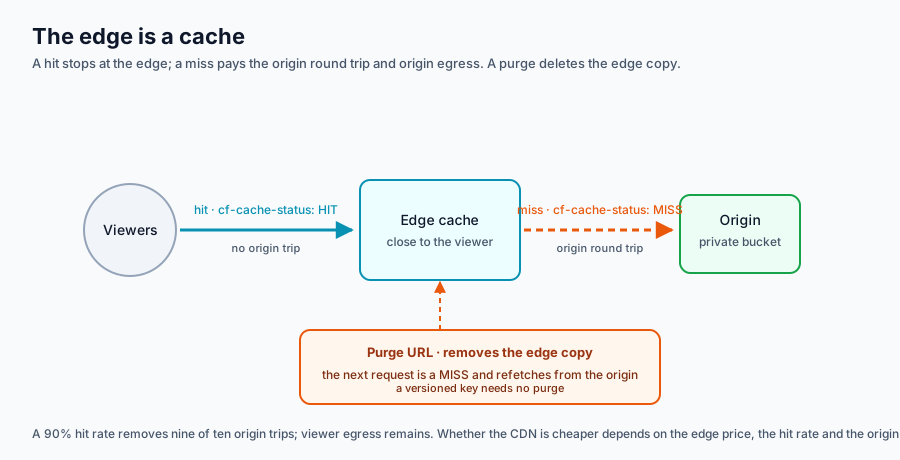
The scene shows viewers, an edge cache and the origin. Switch between a hit and a miss and watch whether the request travels to the origin; use Purge URL to see what an invalidation does to the stored copy.
Switch between a cache hit and a miss. Drag to orbit, scroll to zoom.
Reading the scene. A viewer asks the edge for a thumbnail. On a hit, the edge returns its cached copy and the origin sees no request; on a miss, the edge fetches from the origin, stores a copy and returns it. Purge URL removes that stored copy: the next request is a miss and costs the origin trip again. The origin remains the source of truth, and the edge is a copy with a clock — the TTL decides how long that copy is trusted.
A static version of the same diagram is available if WebGL is unavailable.
Prerequisite: An Active Cloudflare zone for your root domain and a Cloudflare account with R2 enabled. Set it up in Session 0: Domain, Accounts.
Prerequisite: an active Cloudflare zone for your root domain (registered and added in S1 self-study), a Cloudflare account with R2 enabled, Node ≥ 22.12, and the sample folder. If your zone is not active, use the fallback chain at the end — full marks remain available.
You need to know: a CDN copies an origin's bytes to an edge near the viewer. A hit is served from the edge; a miss pays the round trip to the origin and then stores a copy. The TTL is how long that copy stays fresh. An R2 custom domain exposes every key in its bucket, so public and private objects must live in different buckets. A Worker reaches a private bucket through a binding, and a Cache Rule decides what a proxied zone is allowed to keep. The lesson page above carries the full mechanism; this brief stops only to explain what each command does.
Safe-data acknowledgement: I have read the lab safe-data policy. I will use only the course-supplied synthetic media, will not upload real personal media, and will not put account IDs, emails, tokens or signing keys in screenshots or logs.
Task
Deploy the S4 catalogue sample on Cloudflare: two R2 buckets, the Worker on workers.dev, an R2 custom domain for public thumbnails, and a Cache Rule on that hostname. Prove a hit and a miss, reproduce the stale-update failure, recover with a purge, fix the design with a versioned key, and prove the private catalogue is unreachable through the public hostname.
Cache Everything on media.<root>/thumbs/*, Edge TTL 2 h, Browser TTL 60 s
Zone-scoped
Steps
0. Pre-flight: prove the zone and the toolchain
The Cache Rule step later needs a proxied zone; a Worker alone does not give you one. Check the nameservers first, so a failure at step 8 is not a surprise.
# Show the zone's authoritative nameservers. Two Cloudflare nameservers means
# the S1 registration and NS change worked and the zone is active.
dig NS <root> +short

# Node must be 22.12 or newer: the current Wrangler refuses older releases.
node --version

# Confirm which Cloudflare account Wrangler is using, without printing its ID.
npx wrangler whoami
Expected: exactly two *.ns.cloudflare.com nameservers, v22.12.0 or newer, and one account listed.
Panel path:Cloudflare dashboard → the zone → Overview must show Active, and R2 → Overview must show the subscription enabled (the one-time checkout). Without the R2 checkout no bucket exists and no S3 token can be created.
1. Copy the sample and run its tests
The sample is the deployable half of this session. Its tests run offline, against a mocked R2 binding, so they prove the Worker logic before any cloud resource exists.
# Copy the sample out of the course repository (or unzip the Classroom copy).
cp -r course/samples/s4-worker-catalogue ~/s4-worker-catalogue
cd ~/s4-worker-catalogue

# Install the pinned Wrangler and Vitest versions.
npm install

# Run the eight behaviour tests: health, list, detail, the three capability
# refusals, a valid capability, the landing page, no-store headers and
# public/private key isolation. All eight must pass.
npm test
Expected: Test Files 1 passed, Tests 8 passed. If npm test fails, stop: a deployment of a failing Worker cannot produce valid evidence.
2. Create the two buckets
The two-bucket split is the safety design, not tidiness. An R2 custom domain exposes every key in its bucket, so a single bucket would make the private catalogue public the moment the thumbnail hostname is attached.
# Create the public bucket for thumbnails; the custom domain will attach here.
npx wrangler r2 bucket create course-media-public

# Create the private bucket for the catalogue; it never gets a public hostname.
npx wrangler r2 bucket create course-catalogue
Panel path:R2 → Create bucket twice with the same two names. If a name is taken, add a unique suffix and use it consistently in every later command and in the binding.
3. Upload the synthetic objects
Each object has a job in the experiment: the JPEG is the control that caches by default, the manifest is the treatment that only caches after the rule, and the catalogue is the private object that must never appear on the public hostname.
# Version 1 of the thumbnail: the object that will be replaced in place later.
npx wrangler r2 object put course-media-public/thumbs/thumb-0001.jpg \
  --file data/thumbs/thumb-0001.jpg --remote --content-type image/jpeg

# The versioned thumbnail, uploaded now so the final step needs no purge.
npx wrangler r2 object put course-media-public/thumbs/thumb-0001.v2.jpg \
  --file data/thumbs/thumb-0001.v2.jpg --remote --content-type image/jpeg

# The public manifest: JSON, not cached by default, and the rule's real subject.
npx wrangler r2 object put course-media-public/thumbs/manifest.json \
  --file data/thumbs/manifest.json --remote --content-type application/json

# The private catalogue the Worker reads through its CATALOGUE binding.
npx wrangler r2 object put course-catalogue/catalogue.json \
  --file data/catalogue.json --remote

# The one private file behind the signed route.
npx wrangler r2 object put course-catalogue/files/asset-0001.txt \
  --file data/files/asset-0001.txt --remote --content-type text/plain
Expected: five Upload complete lines. The --content-type flag matters: R2 serves what you set, and a JPEG served as application/octet-stream may not follow the same cache path.
Panel path:R2 → the bucket → Objects → Upload, setting the same key and content type. Uploading through the panel is the fallback if Wrangler is blocked; the keys must match exactly.
4. Deploy the Worker and store the signing secret
The Worker needs a key to sign capabilities. A Worker secret is encrypted at rest and injected at runtime; it is never in wrangler.toml, never in git and never on screen for the evidence bundle. Deploy first: Wrangler cannot attach a secret to a Worker that does not exist yet.
# Generate a 32-byte random key for this deployment.
export SIGNING_KEY=$(openssl rand -hex 32)

# Deploy. Wrangler prints the workers.dev URL it created.
npx wrangler deploy

# Upload the key as an encrypted Worker secret; the value is read from stdin.
# The secret takes effect immediately; no second deploy is needed.
printf '%s' "$SIGNING_KEY" | npx wrangler secret put SIGNING_KEY
Expected: a deployment line and https://course-catalogue.<sub>.workers.dev. Keep that URL; every later check uses it.
Panel path:Workers & Pages → Create → Worker, paste src/index.js, then Settings → Variables and Secrets to add STUDIO_NAME (plain text) and SIGNING_KEY (secret), and Settings → Bindings → R2 bucket: binding CATALOGUE, bucket course-catalogue.
5. Verify the API and the capability
Three requests establish that the Worker reads the private bucket. The next three establish the capability boundary: it must refuse, then accept, then refuse again after expiry. That sequence is the evidence that the private file is protected by a clock, not by obscurity.
# Health: ok, the studio name and five assets.
curl -s https://course-catalogue.<sub>.workers.dev/health

# The full catalogue, read live from the private bucket.
curl -s https://course-catalogue.<sub>.workers.dev/assets

# One record.
curl -s https://course-catalogue.<sub>.workers.dev/asset/asset-0001

# No capability: expect 401.
curl -s -o /dev/null -w '%{http_code}\n' \
  https://course-catalogue.<sub>.workers.dev/asset/asset-0001/file

# Print a signed, 60-second capability; paste the printed URL into the next command.
node scripts/sign.mjs asset-0001 https://course-catalogue.<sub>.workers.dev 60

# A valid capability: expect 200.
curl -s -o /dev/null -w '%{http_code}\n' '<printed-url>'

# Wait past the expiry, reuse the same URL: expect 401 again.
sleep 61
curl -s -o /dev/null -w '%{http_code}\n' '<printed-url>'
Expected: {"ok":true,...}, five records, 401, 200, 401. Record the three status codes and the timestamps; do not record the URL. Use curl, not the default Python urllib — workers.dev rejects the stock Python User-Agent with error 1010, and a descriptive User-Agent or curl avoids that trap.
6. Attach the public media hostname
media.<root> is an R2 custom domain: a hostname attached to one bucket. Cloudflare creates a proxied DNS record and the certificate automatically. Do not create the record by hand — a manual CNAME conflicts with the generated one.
# Store the zone ID from the zone's Overview page (right-hand sidebar).
export ZONE_ID=<zone-id>

# Attach media.<root> to the public bucket. The bucket and the zone must be in
# the same Cloudflare account; --zone-id scopes the generated proxied record.
npx wrangler r2 bucket domain add course-media-public --domain media.<root> \
  --zone-id "$ZONE_ID" -y

# Confirm the hostname is attached and the certificate is issuing.
npx wrangler r2 bucket domain list course-media-public
Expected: the domain listed with a certificate status. The first request may take a minute while the certificate issues.
Panel path:R2 → course-media-public → Settings → Custom Domains → Add → media.<root>. Confirm the generated DNS record is proxied (orange cloud).
7. Prove the public path and the private boundary
The JPEG is cacheable by default; the JSON is not. Requesting each twice therefore produces two different stories, and the difference is the reason a Cache Rule exists. The last command is the safety checkpoint: a 404 is the proof that the private key is not exposed.
# First JPEG request: MISS — the edge fetched it from R2 and stored a copy.
curl -sD - -o /dev/null https://media.<root>/thumbs/thumb-0001.jpg | grep -i cf-cache-status

# Second JPEG request: HIT — the edge answered, the origin saw nothing.
curl -sD - -o /dev/null https://media.<root>/thumbs/thumb-0001.jpg | grep -i cf-cache-status

# The JSON manifest: DYNAMIC (or no header) — not eligible for caching yet.
curl -sD - -o /dev/null https://media.<root>/thumbs/manifest.json | grep -i cf-cache-status

# Safety checkpoint: the private catalogue key must be 404 through media.<root>.
# A 200 means the custom domain was attached to the private bucket — fix it now.
curl -s -o /dev/null -w '%{http_code}\n' https://media.<root>/catalogue.json
Expected: MISS, HIT, DYNAMIC, and 404. Write the four outputs down; they are evidence items 3 and the checkpoint.
8. Add the Cache Rule
A Cache Rule is zone-level configuration: for matching requests, it says whether the edge may cache and for how long. The Free plan's minimum Edge TTL is 2 hours, which is why the stale-copy failure later is visible; the Browser TTL is set to 60 seconds so your own browser does not add a second cache in front of the edge.
Panel path:Caching → Cache Rules → Create rule. Match https://media.<root>/thumbs/*; set Cache eligibility: Eligible for cache, Edge TTL: Override origin, 2 hours, Browser TTL: Override origin, 60 seconds. Save and note the rule name.
The API path is equivalent, and the instructor's runner uses it. It needs a token with Zone → Cache Rules: Edit:
# Store the zone ID from the zone Overview page.
export ZONE_ID=<zone-id>

# Create or replace the cache-settings entrypoint with one rule.
curl -s -X PUT \
  "https://api.cloudflare.com/client/v4/zones/$ZONE_ID/rulesets/phases/http_request_cache_settings/entrypoint" \
  -H "Authorization: Bearer $CLOUDFLARE_API_TOKEN" \
  -H "Content-Type: application/json" \
  --data @cache-rule.json
The body in cache-rule.json matches the panel settings:
Now re-run the manifest test. The rule changed what the edge is allowed to keep:
# First manifest request after the rule: MISS.
curl -sD - -o /dev/null https://media.<root>/thumbs/manifest.json | grep -i cf-cache-status

# Second: HIT. Before the rule both were DYNAMIC.
curl -sD - -o /dev/null https://media.<root>/thumbs/manifest.json | grep -i cf-cache-status
Expected: MISS then HIT. The JPEG was already cacheable; the JSON was not; the rule is what changed.
9. Reproduce the stale-update failure, purge, then fix the design
This is the lab's failure-and-recovery moment. A cache is bytes under a key. Overwriting the bytes does not change the key, so the edge keeps its copy until the TTL expires. On this plan that can be two hours, which is long enough to see.
# Make the edge copy definitely warm: request the URL twice and expect the
# second response to print cf-cache-status: HIT. A single request can race the
# edge's store and the origin.
curl -sD - -o /dev/null https://media.<root>/thumbs/thumb-0001.jpg | grep -i cf-cache-status
curl -sD - -o /dev/null https://media.<root>/thumbs/thumb-0001.jpg | grep -i cf-cache-status

# Keep the checksum of the bytes you saw.
curl -s https://media.<root>/thumbs/thumb-0001.jpg -o stale.jpg
shasum -a 256 stale.jpg

# Replace the bytes under the same key with version 2's bytes.
npx wrangler r2 object put course-media-public/thumbs/thumb-0001.jpg \
  --file data/thumbs/thumb-0001.v2.jpg --remote --content-type image/jpeg

# The origin changed; the edge did not. The checksum still matches stale.jpg.
curl -s https://media.<root>/thumbs/thumb-0001.jpg -o after-upload.jpg
shasum -a 256 after-upload.jpg
Expected: both checksums match. The upload succeeded and the edge still serves the old copy — cf-cache-status: HIT. Diagnose it from the status header, not from the upload log.
Recover with a purge. A purge is a correction, not a publishing strategy. On the Free plan it is limited to 5 per minute.
Panel path:Caching → Cache Purge → Purge by URL, paste https://media.<root>/thumbs/thumb-0001.jpg. API equivalent (needs Zone → Cache Purge):
# Remove the one cached URL from the edge.
curl -s -X POST \
  "https://api.cloudflare.com/client/v4/zones/$ZONE_ID/purge_cache" \
  -H "Authorization: Bearer $CLOUDFLARE_API_TOKEN" \
  -H "Content-Type: application/json" \
  -d '{"files":["https://media.<root>/thumbs/thumb-0001.jpg"]}'

# The next request misses, fetches the new bytes, and the checksum changes.
curl -s https://media.<root>/thumbs/thumb-0001.jpg -o fresh.jpg
shasum -a 256 fresh.jpg
Expected: fresh.jpg has a different checksum from stale.jpg. The purge worked.
Fix the design. A versioned name is not a new key to purge; it is a new key from the start. The lab uploaded thumb-0001.v2.jpg in step 3 for exactly this moment.
# The versioned key's first request: MISS.
curl -sD - -o /dev/null https://media.<root>/thumbs/thumb-0001.v2.jpg | grep -i cf-cache-status

# Second request: HIT. No purge anywhere in this flow.
curl -sD - -o /dev/null https://media.<root>/thumbs/thumb-0001.v2.jpg | grep -i cf-cache-status
Expected: MISS then HIT. In your note, state which object in the unit's workflow should be versioned and which one genuinely needs a purge.
10. Measure, write the evidence, tear down
Open the lab notebook and replace its sample table with your measurements. The notebook computes the hit rate, origin offload, the three-row delivery comparison, the TTL-floor exercise and the Worker request headroom, then writes cdn_results.json.
Evidence bundle — nine items
The deployed Worker's /health JSON (the URL visible, no token or account ID).
/assets and one /asset/:id response.
The output of step 7: the JPEG MISS → HIT, the JSON DYNAMIC before the rule, and the catalogue.json404 checkpoint.
The Cache Rule configuration (pattern, Edge TTL 2 h, Browser TTL 60 s) — a panel screenshot or the API response — and the purge with before/after checksums.
The versioned key's MISS → HIT with no purge.
The capability sequence 401 → 200 → 401, with timestamps and the URL redacted.
The sanitized command log from your own run.
The teardown log, an empty bucket list, and doctl compute droplet list showing no Droplet.
A 150–250 word what this proves note.
Say for each item what it proves, not just what it is. The bundle is scored 3/2/1/0 (see PLO.md).
Failure and recovery
Symptom
Likely cause
Fix
dig NS shows non-Cloudflare servers
Registrar still lists its own NS, or an extra NS remains
Replace the full list with the two Cloudflare NS; wait; recheck
media.<root> returns 404 for every key
Custom domain not attached, or certificate still issuing
npx wrangler r2 bucket domain list; wait a minute; recheck
catalogue.json returns 200 on media.<root>
The custom domain points at the private bucket
Remove it and attach it to course-media-public — this is a data-exposure bug
cf-cache-status: DYNAMIC after the rule
Rule not saved, wrong zone, wrong host, or path not matching
Check the rule expression and that the request host is exactly media.<root>
Manifest still HIT with old bytes after upload
The 2 h edge TTL is doing its job
Purge that URL; then use a versioned key next time
The one-time R2 subscription checkout is incomplete
Complete it in the dashboard; then rerun step 2
Purge returns 429
More than 5 purges in a minute
Wait 60 seconds; one URL is enough for this lab
Cost ceiling
$0 on Cloudflare for every path in this lab: Workers Free (100,000 requests/day), R2 Free (10 GB storage, free egress), Cloudflare CDN on the Free plan. The domain is student-paid and outside the lab envelope. No DigitalOcean resource is created, so there is no Droplet or volume cost.
Teardown
Remove the custom domain before deleting the bucket, or the bucket delete fails.
# Remove the public hostname.
npx wrangler r2 bucket domain remove course-media-public --domain media.<root> -y

# Delete the Worker.
npx wrangler delete course-catalogue

# Delete every object, then both buckets.
npx wrangler r2 object delete course-media-public/thumbs/thumb-0001.jpg --remote
npx wrangler r2 object delete course-media-public/thumbs/thumb-0001.v2.jpg --remote
npx wrangler r2 object delete course-media-public/thumbs/manifest.json --remote
npx wrangler r2 object delete course-catalogue/catalogue.json --remote
npx wrangler r2 object delete course-catalogue/files/asset-0001.txt --remote
npx wrangler r2 bucket delete course-catalogue
npx wrangler r2 bucket delete course-media-public

# Prove no DigitalOcean Droplet survived from the earlier sessions.
doctl compute droplet list

# Prove the public hostname no longer serves content.
curl -s -o /dev/null -w '%{http_code}\n' https://media.<root>/thumbs/thumb-0001.jpg
Panel path:Caching → Cache Rules → the rule → Delete; R2 → the bucket → Settings → Custom Domains → remove; Workers & Pages → course-catalogue → Delete. Keep the bucket list empty in the screenshot.
Fallback chain
If the zone is missing or inactive, the lab still works, and full points remain available if your note names each substitution:
Worker on workers.dev — steps 1–5 are unchanged. Prove hit/miss with Workers Cache: uncomment [cache] in wrangler.toml, set enabled = true, redeploy, and request the same Worker URL twice. Its limitation is part of the lesson: Workers Cache can only be purged from inside the Worker.
Instructor demo hostname — for the Cache Rule, purge and versioned-key evidence, use the hostnames and bucket announced in class. The commands are identical with <root> replaced by the demo root; say so in the note.
Wrangler blocked — the instructor-verified dashboard path in the sample's README produces the same evidence.
Cloudflare account blocked — wrangler dev --local plus the demo hostname and the notebook still produce the Worker, capability and calculation evidence. A fallback that changes the submitted shape is a defect; if the shape must change, say exactly how and why.
Notebook
Open the lab notebook; it computes the hit rate, the origin offload, the three-row delivery comparison and the Worker headroom from your measurement table, and writes cdn_results.json.
Downloads for this session
Each document name opens a rendered view you can read in the browser. The download link beside it gives you the raw Markdown working file: the copy you edit, run and submit. The page above and the lab steps carry the teaching.
The runnable notebook that produces the lab's numbers.
Research question
How should the unit choose and price a CDN such as Cloudflare for 300 video views and 5,000 thumbnails a day when latency, egress and cache hit rate trade against each other?
Submit an 800–1,200 word answer with 5–8 sources at the next session. The rubric and the exemplar guidance show the expected shape.
References — Session 4
Pallis, G., & Vakali, A. (2006). Insight and perspectives for content delivery networks. Communications of the ACM, 49(1), 101–106. https://doi.org/10.1145/1107458.1107462
The classic CDN vocabulary — surrogate, origin, cache consistency — used on the page. Cost-aware CDN selection for small catalogues is still mostly vendor guidance, not independent research. No essential figure; the request path becomes the node-graph scene.
Nygren, E., Sitaraman, R. K., & Sun, J. (2010). The Akamai network: A platform for high-performance internet applications. ACM SIGOPS Operating Systems Review, 44(3), 2–19. https://doi.org/10.1145/1842733.1842736
A production CDN end to end: DNS mapping, edge clusters, failover and measurement. Edge compute for personalised media adds a cost and privacy trade-off the architecture predates. The topology figure needs permission or a redraw.
Pathan, A.-M. K., & Buyya, R. (2008). A taxonomy of CDNs. In Content Delivery Networks (pp. 33–77). Springer. https://doi.org/10.1007/978-3-540-77887-5_2
A comparison grid students can reuse for the provider comparison. The taxonomy has no serverless-edge or AI-personalisation dimension; extending it is a possible research question. Tables can be rebuilt from the taxonomy.
Teaching note. Narrate Pallis & Vakali (2006) for 5–8 minutes, assign the recent paper's abstract, and close by restating the open problem as the weekly question. Figures are third-party; redraw by default.
PLO — Session 4: Networking and delivery
CLO: By the end of this session, the student can explain where Cloudflare's edge shortens the path, measure a cache hit rate, deploy the catalogue Worker, and choose a delivery configuration against latency and egress cost.
PLO
Role
Research answer
Lab evidence
Points
Evidence
Rubric
PLO2
primary
4
0
4
An 800–1,200-word CDN choice with 5–8 sources and a priced comparison
Research 4/3/2/1
PLO1
secondary
0
3
3
The Cloudflare evidence bundle: the deployed Worker /health, the cf-cache-status before and after the Cache Rule, the purge, the versioned key and the expiring capability
Lab 3/2/1/0
Total
4
3
7
Total: 7 points
Four-level descriptors
Research (4/3/2/1). 4 = a clear CDN choice with hit-rate, latency and egress modelled, a counterargument about origin offload and a decision metric. 3 = a sensible choice with some pricing and one under-analysed dimension. 2 = describes CDNs but does not choose or price one. 1 = a summary with fewer than five sources. 0 = nothing submitted or misconduct.
Lab (3/2/1/0). 3 = the Worker answers /health and /assets, the Cache Rule produces MISS then HIT, the purge and versioned key are evidenced, the capability works then expires, teardown and cost respected. 2 = mostly complete, one check missing. 1 = partial evidence or incomplete teardown. 0 = nothing submitted, unsafe data, or no teardown.
The full course arithmetic is in production/baseline.md; this file is the weekly instance.